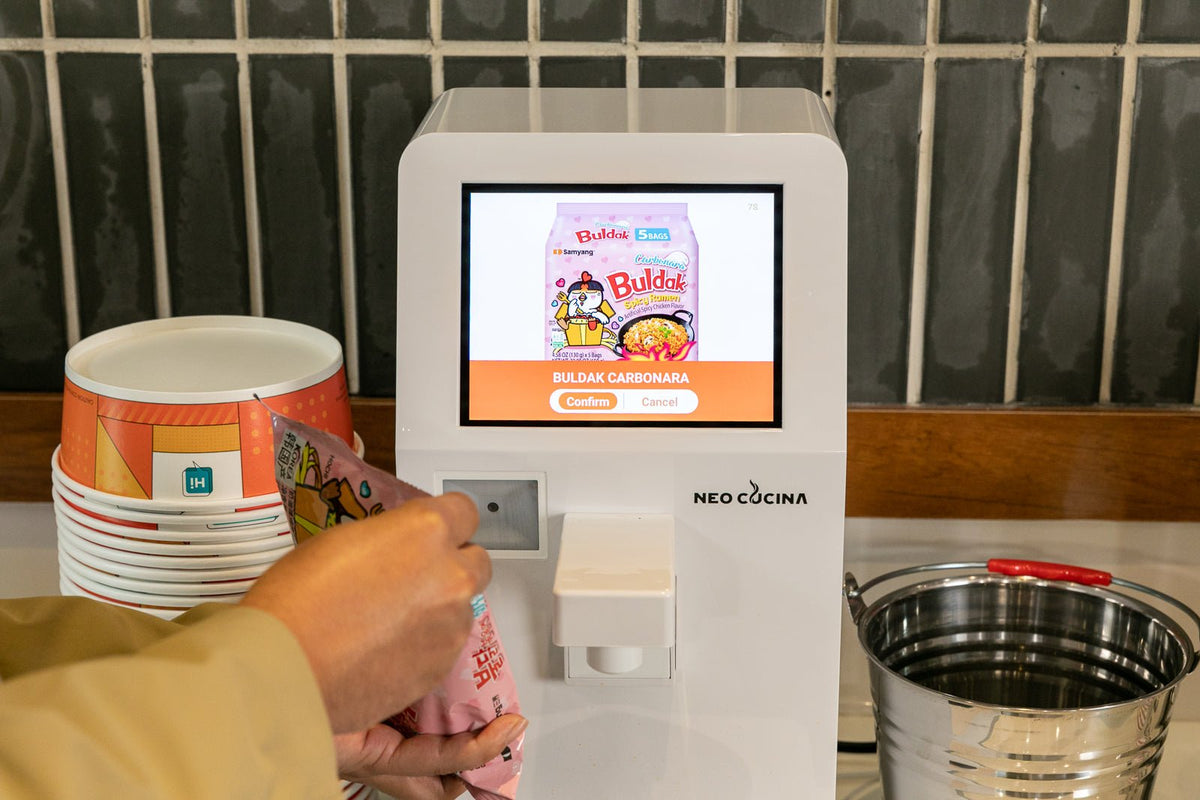
A barcode ramen cooker uses the barcode on a packaged ramen product to find a saved cooking program. On the NEO CUCINA Pro, that program can control the water amount, heating level, and cooking time for a recognized product. The barcode does not cook the ramen by itself. It works as a lookup key that tells the machine which tested settings to use.
This matters because different ramen products need different amounts of water and different cooking times. A thin noodle cup and a thick Korean stir-fry noodle should not run the same cycle. Barcode cooking turns those product-specific instructions into a repeatable workflow that a customer or staff member can start without measuring water or setting a separate timer.
What happens when you scan a ramen package?
The basic NEO CUCINA Pro workflow is straightforward:
- Place a suitable induction-safe bowl on the heating surface.
- Add the noodles and any ingredients that should cook with them.
- Scan the barcode printed on the ramen package.
- The Pro looks for a matching program in its ramen library.
- Follow the on-screen prompt to begin the cycle.
- The machine dispenses the programmed amount of water, applies induction heat, and stops when the program ends.
The exact food preparation still depends on the product. Some seasoning packets go in before cooking, while sauces, oils, or dried toppings may be added later. The package instructions remain the starting point for deciding how the bowl should be assembled.
What information does the barcode control?
A retail barcode normally identifies the product, not the recipe itself. The NEO CUCINA Pro connects that identifier to a saved cooking program. The program can include the settings that matter most for a bowl of ramen:
- Water volume
- Cooking time
- Heating level
This separation is useful. If a tested program needs an adjustment, the cooking settings can be updated without changing the barcode printed on every package. When the Pro is online, supported menu and program updates can be delivered through the connected system.
Why barcode cooking is more than a convenience feature
It reduces choices at the machine
Without a saved program, someone has to choose the water amount and time for every bowl. That is manageable for a trained operator, but it creates friction at a self-serve station. Scanning lets the package make the first selection.
It helps standardize repeat orders
A saved program gives the same product the same starting settings each time. Results can still vary if the bowl is assembled incorrectly, the wrong amount of food is added, or ingredients are added in the wrong order. Barcode cooking improves repeatability, but it does not replace basic station instructions.
It supports real boiling and cooking
The Pro uses induction heat to bring the bowl into an active cooking cycle. That is different from pouring hot water over noodles and waiting. Real boiling can make a material difference in the texture of thicker noodles and products designed to be cooked, not merely rehydrated.
For a broader explanation of product compatibility, see Can You Use Any Ramen Brand in an Automatic Ramen Cooker?
How many ramen products can the Pro recognize?
The current NEO CUCINA Pro product information states that more than 100 ramen varieties sold in the United States are recognized, with additional products added through cloud updates. Recognition applies to individual packaged products, not automatically to every item made by the same brand.
That distinction matters because one brand may sell several flavors, sizes, noodle formats, or regional versions. Two packages that look similar can have different barcodes and different cooking requirements.
What if the barcode is not recognized?
An unrecognized barcode does not necessarily mean the ramen cannot be cooked. It means the Pro does not currently have a matching scan program available for that specific package.
You have two practical options:
- Use a one-tap preset. The Pro has four editable presets that can be configured on the 8-inch touchscreen or through the web dashboard. Test the product first and save suitable settings for your station.
- Request a product review. Send NEO CUCINA clear photos of the package, the barcode, and the manufacturer's cooking instructions. The product and its settings can then be reviewed for the ramen library.
Do not assume that a program for a similar-looking package is correct. Water amount, noodle thickness, serving size, and preparation steps can differ.
Does barcode cooking require Wi-Fi?
Not for every scan. Pro can use barcode cooking offline when the matching program was previously downloaded to the machine while online. It uses 2.4 GHz Wi-Fi to download new barcode programs and receive cloud menu updates. Core cooking and hot water functions also work offline; on-machine payment still requires connectivity.
For a new machine, connect it to Wi-Fi before testing the scanner. Give it time to download available menu or software updates, then confirm that the current ramen library appears. The NEO CUCINA Pro setup guide covers the sequence from placement through the first test bowl.
Barcode cooking is a Pro feature, not a Studio feature
The NEO CUCINA Pro includes the built-in scanner, touchscreen, connected ramen library, four one-tap presets, and web dashboard access.
The NEO CUCINA Studio follows a different operating model. It has no scanner, account, or Wi-Fi setup. Studio stores three presets on the machine and is designed for a simpler local workflow. Both models can genuinely boil and cook noodles, but only Pro uses the package barcode to select a matching cooking program, including previously downloaded programs when offline.
How to make barcode cooking easier for customers
A good station still needs clear physical instructions. Keep the steps short and place them where a customer sees them before opening the package.
- Show where to place the bowl.
- Show where to aim the package barcode.
- Explain when to add seasoning, sauce, and toppings.
- Tell customers not to move the bowl during water dispensing or cooking.
- Provide a clear fallback instruction if a barcode is not recognized.
Before offering a product to customers, run several complete test bowls using the exact package and container you plan to stock. Check noodle texture, final water level, seasoning sequence, boil-over risk, and the clarity of the on-screen flow.
Frequently asked questions
Does scanning the barcode automatically know the package instructions?
No. The barcode identifies the packaged product. The Pro then looks up a cooking program that has already been connected to that identifier.
Can the Pro cook ramen if its barcode is missing from the library?
Usually, yes, if the ramen itself is suitable for boil-in-bowl cooking and you have tested appropriate settings. Use an editable preset instead of selecting an unrelated barcode program.
Can I change the cooking settings?
The Pro's four one-tap presets can be edited on the touchscreen or through the web dashboard. Changes to a shared barcode-linked program should be reviewed because other operators may use the same packaged product.
Does the barcode scanner also take payment?
No. The built-in scanner reads the product package to select a cooking program. Payment is a separate operating step and can use the Pro's supported on-machine QR checkout or an operator's existing checkout process.
What should I send if I want a new ramen product reviewed?
Send clear photos of the front and back of the package, a readable barcode, and the manufacturer's cooking instructions. Include the exact size and flavor because related products may use different programs.
The practical takeaway
Barcode cooking is valuable because it turns a packaged ramen SKU into a repeatable set of cooking instructions. It reduces customer decisions, supports consistent water and time settings, and makes it easier to manage a varied ramen selection. It works best when the Pro is online, the exact product is recognized, and the station operator has tested the complete bowl before customer use.
To build a scan-based self-serve station, review the current NEO CUCINA Pro details or contact NEO CUCINA with the packaged ramen products you plan to offer.
Share:
Can You Use Any Ramen Brand in an Automatic Ramen Cooker?
Can You Use Other Bowls and Pots with a Ramen Cooker?